Product Updates
Product Updates
We're continuously updating SerpWow to add features and functionality, most of which are a direct result of requests from customers. See the latest updates below. Within the SerpWow Dashboard you can subscribe to be alerted via email when new updates are released.
October 2025
Update Type | Capture AI Overviews Embedded in Related Questions |
|---|---|
Enhancement | Our Google Web API now extracts AI-generated content from “People Also Ask” dropdowns, expanding coverage of AIO insights. What's NewWe’ve added support for parsing ai_overview content embedded inside each related_questions block (also known as People Also Ask) when present. These AIOs often show up directly beneath follow-up questions on Google SERPs. How To Use ItAdd the parameter: "include_ai_overview": true - AIO content will now appear under the related_questions[ ].ai_overview key in the API response. - No additional request is made - Each AIO returned adds 1 credit to the query cost What This Means for YouYou’ll now get a more complete picture of how AI-generated answers are used not just in the main SERP area, but also within follow-up questions. This is especially valuable for understanding how Google’s generative results reinforce topical authority and guide user journeys deeper into related content. For questions or help getting started with this update, please reach out to your Customer Success Manager or to our support team. |
September 2025
Update Type | Enhance Entity Matching, Contextual Insight, and Mobile Parity Across Google SERPs |
|---|---|
Enhancement | We’ve released three enhancements to expand access to structured fields across Google Web and Shopping Search types—improving entity resolution, shopping insights, and mobile coverage. jmm 1. Access Knowledge Graph IDs in Local ResultsWhat's New Local business listings now include the knowledge_graph_id field when available. This unique identifier (e.g., /g/11b6w9zg1z) allows you to deduplicate entities and cross-reference with external datasets or knowledge graphs. What This Means For You Great for building linked data pipelines, improving accuracy in entity resolution, or enhancing analytics on location-based search visibility. 2. Capture Unit & Currency Conversion TablesWhat's New We now parse the conversion_table when present in Google Web Search results. This includes exchange rate widgets and unit conversions (e.g., “100 USD to EUR”). What This Means for You Ideal for monitoring how Google surfaces dynamic conversions and for enriching SERP snapshots with structured value tables. 3. Mobile Support for Shopping Graphs in Google WebWhat's New The shopping_graphs field is now included in Google Web results when device=mobile is specified. Previously, this was only available on desktop. What This Means for You Mobile parity lets you track how Google renders product-related graphs on handheld devices—ideal for mobile SEO visibility and shopping trend monitoring. For questions or help getting started with this update, please reach out to your Customer Success Manager or to our support team. |
Update Type | Access Related Categories from Google Search Results |
|---|---|
Enhancement | You can now extract “Related Categories” for public figures, companies, and other entities surfaced on Google Search. What's NewOur Google Web API now parses and returns structured data for the “Related Categories” shown in Google search results. These categories—like Books, Videos, or Education—offer deeper topical context and let you explore additional search paths tied to a given entity. How It WorksThe API response now includes a new related_categories object (when present), which contains: - name: Entity name (e.g., “Nike”) - description: Entity type (e.g., “Company”) - link: Google Search result URL - image: Base64-encoded image - category_links: Array of related categories, each with a label and URL (e.g., Shoes, Running, Sustainability, Athletes, News) Supports both desktop and mobile SERPs. No changes needed to your request format. What This Means for YouThis enhancement gives you more structured insights into how Google contextualizes well-known people and organizations. It’s especially useful for brand monitoring, semantic analysis, and surfacing related topics for enrichment or downstream research. For questions or help getting started with this update, please reach out to your Customer Success Manager or to our support team. |
Update Type | Enable Ads-Optimized Search via CSV Batch Uploads |
|---|---|
New Feature | You can now control the ads_optimized setting directly from your CSV input when using Google Search batches. What's NewWe’ve added CSV support for the ads_optimized parameter in the Search field group. This applies to all Google-based search batches (engine=google, type=search). You can now configure ad-focused result rendering directly from your CSV inputs. How It Works- In your CSV upload, add a column titled ads_optimized - For each row, set the value to true (lowercase) to enable the setting Example Request q, ads_optimized
Running shoes, true What This Means for YouThis enhancement makes it easier to run large-scale, ad-focused search experiments or campaigns by configuring everything in a single CSV. It streamlines your workflow, especially when managing multiple queries that require granular control of ad visibility. For questions or help getting started with this update, please reach out to your Customer Success Manager or to our support team. |
July 2025
Update Type | Access Store-Level Restaurant Menu Pricing via API |
|---|---|
New Feature | What's NewYou can now retrieve real-time, store-specific menu pricing from major U.S. restaurant websites using SerpWow. This new capability was originally developed in response to customer demand and is now available for broader use. It’s ideal for identifying pricing discrepancies between restaurant websites and third-party delivery platforms like DoorDash or Uber Eats. How It WorksTo use this capability, call the SerpWow API using the new menuhub engine along with a supported restaurant name and store_id. The API will return a structured list of menu items—including name, description, and store-specific pricing. Output is available in JSON or CSV for easy ingestion. This feature currently supports major U.S. restaurant chains such as Applebee's and Qdoba. For items with multiple sizes (e.g., drinks), the lowest-priced variant is returned to support standardized comparisons. Store IDs can be found in our reference list. Example Request GET https://api.serpwow.com/menu?engine=menuhub&restaurant=applebees&store_id=22136&api_key=YOUR_KEY Sample Output {
"menu_items": [
{
"name": "Create Your Own Surf & Turf Bowl",
"price": 14.95
},
{
"name": "Create Your Own Citrus Lime Shrimp Bowl",
"price": 13.45
}
]
} What This Means for YouWith the Menu Pricing API, you can now: - Audit price discrepancies between in-store and delivery listings - Monitor pricing consistency across restaurant locations - Investigate support complaints related to pricing mismatches - Feed accurate, store-level pricing data into your analysis or QA workflows Whether you’re a food delivery platform, consumer watchdog, or pricing analyst, this feature gives you transparent, granular access to real-world pricing data with minimal setup. For questions or help getting started with this update, please reach out to your Customer Success Manager or to our support team. |
June 2025
Update Type | More Complete Pickup & Delivery Data from Google—Now with Fee Info and Mobile Support |
|---|---|
Enhancement | We’ve enhanced the order_online=true parameter in the Google Web API to return richer structured data from Google’s Knowledge Graph—now including pickup and delivery options on mobile and fee descriptions like service and delivery charges. What's NewWhen you include order_online=true in your request, the API now returns: - Structured pickup and delivery links - Platform metadata (name, domain, logo) - New: Delivery and service fee descriptions (e.g., “Service fee 5%–15%. Delivery fee may apply.”) - Support for both desktop and mobile SERPs. 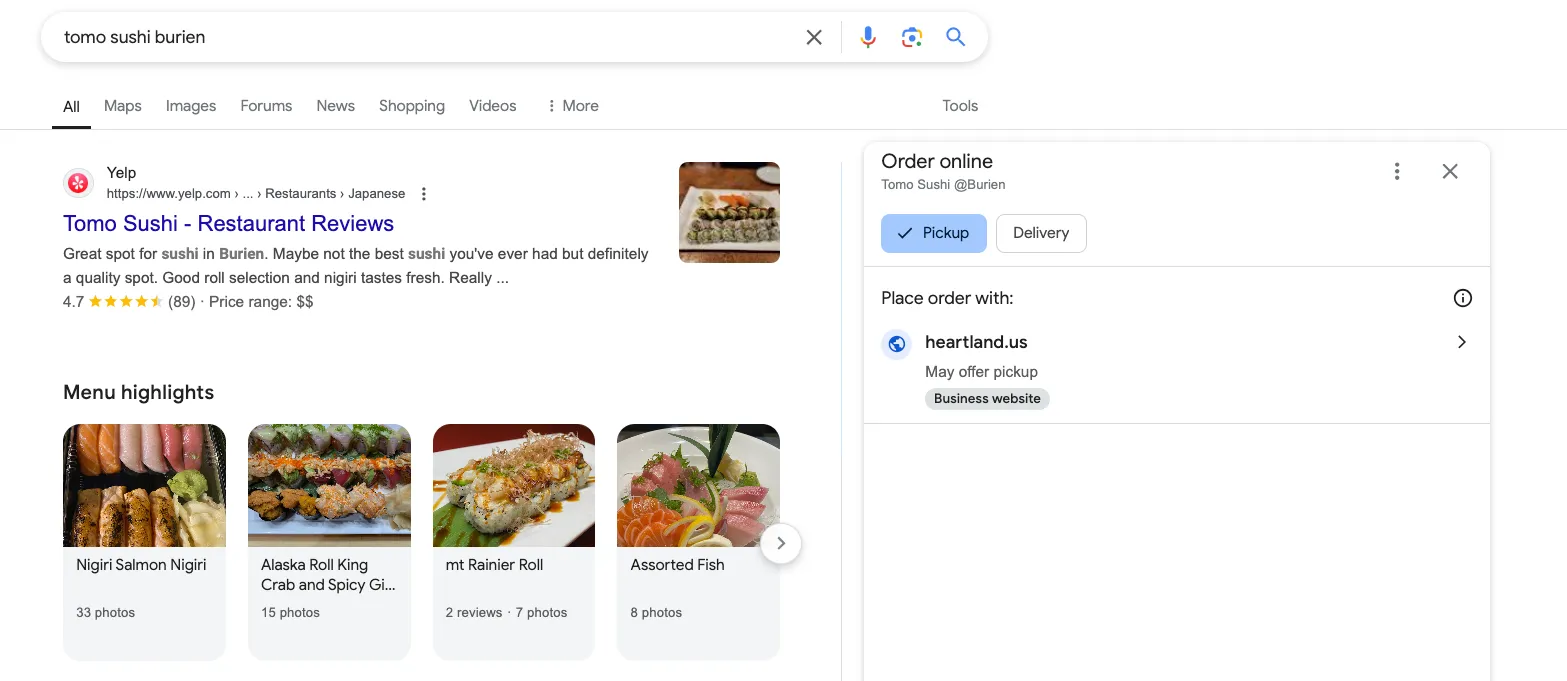 Example Output: "delivery": [
{
"link": "https://www.trycaviar.com/store/13-coins...",
"platform": {
"domain": "trycaviar.com",
"name": "Caviar",
"image": "https://lh3.googleusercontent.com/..."
},
"text": "Caviar",
"description": "Service fee 5%–15% · Delivery fee may apply"
}
] Please note: This description field is returned when available, for both pickup and delivery. What This Means for YouYou now get more complete, structured data from local restaurant and retail results—enabling: - Accurate fee and delivery visibility per platform - Better user experience for food delivery apps and aggregators - More detailed tracking for price comparison, provider coverage, or auditing For questions or help getting started with this update, please reach out to your Customer Success Manager or to our support team. |
Update Type | Capture AI Overviews from All Google Domains Worldwide |
|---|---|
Enhancement | Our Google Web API now supports AI Overviews (AIO) on all Google-supported domains across 200+ countries and 40+ languages. What's NewYou can now extract AI-generated answers from international SERPs, following Google’s global AIO rollout announced in May 2025. This enhancement aligns with how Google is evolving search results across regions, enabling more complete competitive tracking and content benchmarking. How to Use It- Ensure the q (query) parameter matches the primary language of the target domain. -- For example: queries to google.fr must be in French to receive AIO data. - AI Overview results remain billed at 1 extra credit per request. - Coverage includes both desktop and mobile SERPs. What This Means for YouThis update expands your visibility into global AI search behavior, letting you monitor how AI Overviews are presented in different countries and languages. It’s especially valuable for SEO intelligence, content localization analysis, and international SERP research. For questions or help getting started with this update, please reach out to your Customer Success Manager or to our support team. |
May 2025
Update Type | Improved Google Shopping Structure + Knowledge Graph IDs in Places |
|---|---|
Enhancement | We’ve released two enhancements that improve how you parse Google Shopping and Google Places data. These enhancements improve results fidelity and unlock new opportunities for categorization, entity resolution, and structured integration. 1. Google Shopping: Categorized Carousels Now ParsedCapture structured groupings in type=shopping results. What’s New Google has introduced categorized product carousels in Shopping search results—like “Non-prescription blue light glasses” or “Amber tint blue light glasses”—that now appear above the general “All Products” section. 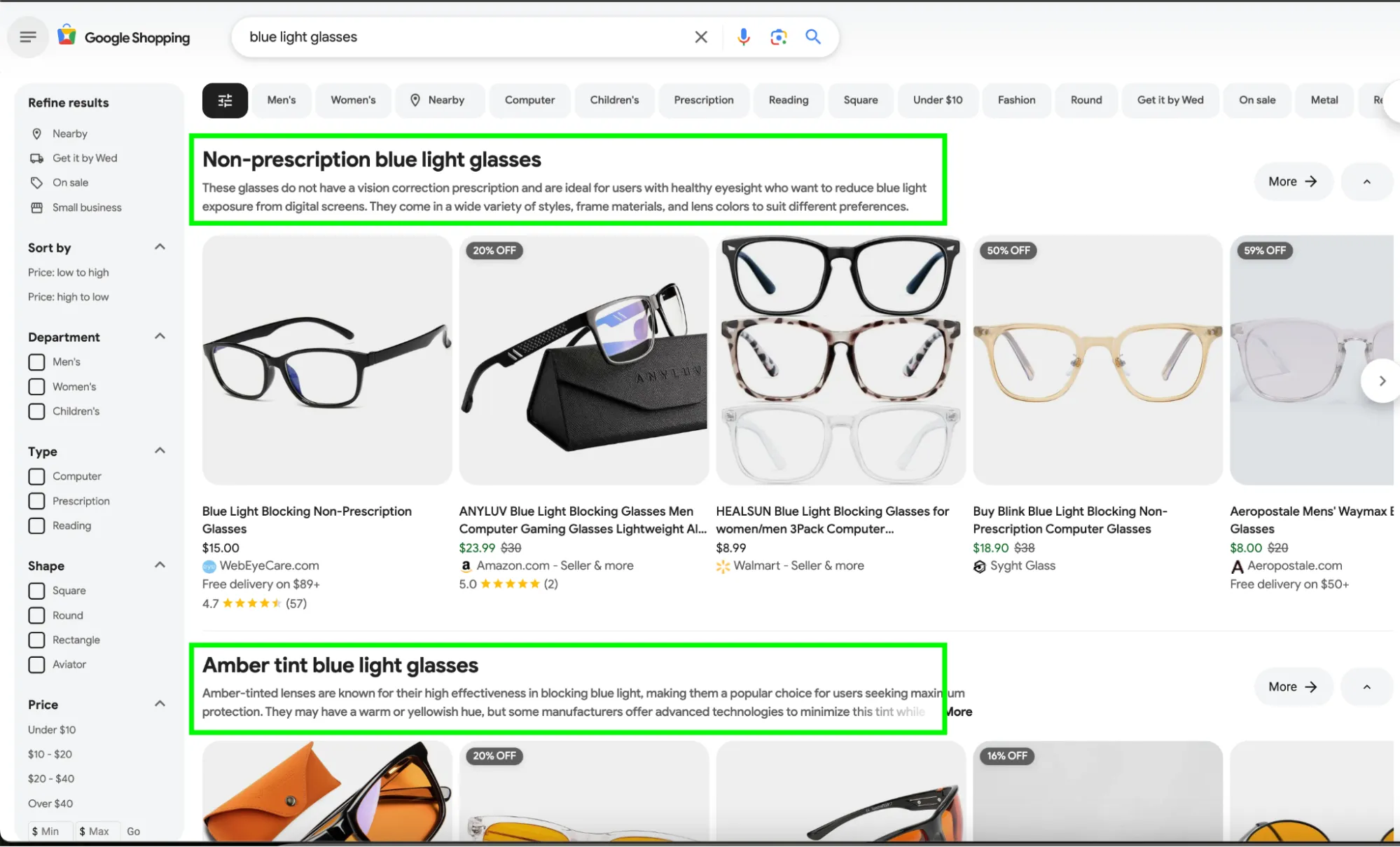 Previously, all results were returned under a flat shopping_results list. We now parse and retain this category context when it’s available, so you can distinguish results by grouping. What This Means for You - You’ll see clearer distinctions between grouped results and “All Products” - Your QA and ranking logic can now reflect Google’s intent and layout - You can segment product data by theme or promotion for smarter reporting 2. Google Places: Knowledge Graph IDs Now AvailableGet structured Knowledge Graph links for Places results What’s New Each result in the places_results object now includes a knowledge_graph_id (when available), giving you a stable, structured link to Google’s Knowledge Graph entity for that business or place. Example Response: "places_results": [
{
"title": "The Independent Pizzeria",
"data_cid": "10007672793471846739",
"knowledge_graph_id": "/g/1tfdyk04"
}
] What This Means for You - You can now link Places data to Google’s structured Knowledge Graph - This helps with de-duplication, enrichment, and entity resolution - It’s especially useful for integrating with external location data or knowledge systems For questions or help getting started with this update, please reach out to your Customer Success Manager or to our support team. |
Update Type | Expanded Google SERP Coverage Now Includes Menu Highlights, Refine Products, and More |
|---|---|
Enhancement | We’ve rolled out several enhancements to SerpWow’s Google Web results to capture more rich features from both Desktop and mobile SERPs—giving you deeper insight into related search behavior, product discovery, and restaurant visibility. What’s NewThe following structured SERP features are now parsed and returned when present in Google results: 1. “Find Results On” (Desktop & Mobile) Captures links to third-party marketplaces or content hubs related to the search. Includes structured fields like: - Title - Source (e.g., Gumtree, Facebook) - Domain, link, image, and position 2. "People Also Search For” (Desktop & Mobile) Returns a list of related queries typically shown at the bottom of a search result. This is great for understanding user search journeys and expanding query coverage. 3. "Refine Products” (Desktop & Mobile) Captures refinement suggestions shown for shopping/product searches. These structured options can support faceted navigation and product clustering. 4. “Menu Highlights” (Desktop Only) Extracts structured dish data from restaurant SERPs, including: - Dish name (e.g., “Cocktails”, “Scallops”) - Review Count - Photo Count - Image (when available) What This Means for YouThese enhancements make SerpWow more valuable for: - Local search intelligence (Menu Highlights, Find Results On) - eCommerce discovery and refinement (Refine Products) - Keyword expansion and clustering (People Also Search For) With minimal changes to your integration, you can now capture even more signals from the modern Google SERP. For questions or help getting started with this update, please reach out to your Customer Success Manager or to our support team. |
Update Type | Save More & Stay Covered With Two New Billing Features |
|---|---|
Enhancement | We’ve launched two new features to help you save money and reduce billing-related disruptions. 1. Switch to an Annual Plan & Save Up to 20%You can now upgrade to an Annual Plan and enjoy up to 20% in savings over monthly billing. It’s the same API you rely on, just with more value and fewer invoices. Many customers are switching to annual to simplify billing and lock in long-term savings. How to switch to an Annual Plan: 1. Log in to your account 2. Navigate to Account in the left-hand navigation 3. Go to Plan & Payment 4. Click Choose a Plan, then select your preferred Annual Plan Log in to your account to get started and switch to an annual plan today! 2. Add a Backup Credit Card to Acvoid DisruptionsYou can now add a secondary credit card to your account. If your primary card fails (due to expiration, fraud blocks, or insufficient funds), we’ll automatically attempt to charge your backup — helping you avoid account suspension and API service interruptions. How to add a backup card: 1. Log in to your account 2. Navigate to Account in the left-hand navigation 3. Go to Plan & Payment 4. Click Manage Payment Method 5. Click Add a New Card and enter your backup credit card details 6. You can set it as default at any time with the Set as Default option Log in to your account to manage your payment methods. For questions or help getting started with this update, please reach out to your Customer Success Manager or to our support team. |
April 2025
Update Type | Selective Parsing: Control Which Fields Are Returned in Google Web Responses |
|---|---|
Enhancement | You can now fine-tune your Google Web API responses by specifying which top-level objects you want returned. This enhancement reduces payload size, improves efficiency, and gives you more control over your data. What’s NewUse the new fields parameter to request only specific top-level objects such as local_results, organic_results, or knowledge_graph. How to Use ItWorks with both GET and POST requests. Example Usage — Return only local results: https://api.serpwow.com/search?api_key=YOUR_KEY&fields=local_results&q=tomo+sushi Example Usage — Return multiple top-level objects: https://api.serpwow.com/search?api_key=YOUR_KEY&fields=local_results,organic_results&q=tomo+sushi Notes: - Omitting fields or passing an empty array returns all top-level objects - Invalid field names are ignored; valid ones are processed - Nested fields are not supported—only top-level objects What This Means for YouBy specifying only the fields you need, you can reduce payload size, lower bandwidth usage, and speed up downstream processing. This makes your integration more efficient and responsive—especially when working at scale. For questions or help getting started with this update, please reach out to your Customer Success Manager or to our support team. |
Update Type | Detail |
|---|---|
Enhancement | AIO Enhancements: Unlock Deeper Google AI Overview InsightsWe’ve shipped a set of enhancements to improve how you extract and analyze Google AI Overview (AIO) data. These updates include better device coverage, richer source parsing, and expanded output formats—helping you scale your insights faster in a more flexible manner. 1. CSV Output for AIO Results on DesktopExport Google AIO data as CSV from your desktop searches. What's New You can now export AI Overview results from Google searches in CSV format. This includes structured fields for banners, content, sources, and footers—ideal for bulk analysis and ingestion into internal systems. How to Use It Include these parameters: - engine=google - output=csv - Request only AIO fields For more information, please see our CSV Fields documentation. What This Means for You Whether you’re benchmarking generative content, comparing source usage, or reporting at scale, this CSV support gives you a clean, structured output that’s ready for analysis or integration. 2. Mobile Support for Google AIO (US Only)Extract AIO results from mobile searches on google.com What’s New AIO data is now available for mobile device searches on the Google US domain. This unlocks visibility into how Google’s AI-generated content appears on mobile—critical for mobile-first indexing and SEO strategy. How to Use It Required parameters: - engine=google - include_ai_overview=true - device=mobile - .com domain or a US location Cost: 1 additional credit (only charged if AIO is returned) What This Means for You You can now analyze and adapt to AIO content as it appears on mobile—helping you fine-tune keyword strategies and stay ahead of algorithm shifts, especially in mobile-heavy markets. 3. Expanded Source Retrieval for Google AIOParse all sources listed under “Show All” in the AIO overview What’s New We now capture all sources revealed when the “Show all” button is clicked in the Google AIO panel. This lets you access the full set of references used in a given AI Overview response. How to Use It - Supported only for google.com domain - When AIO includes a “Show all” button, all expanded sources are retrieved What This Means for You Gain richer insight into the breadth of citations behind Google’s AI summaries—perfect for transparency, source credibility analysis, and understanding evolving AIO sourcing trends. For questions or help getting started with this update, please reach out to your Customer Success Manager or to our support team. |
Update Type | Detail |
|---|---|
Enhancement | Improved Ad Coverage in Google SERPsWe’ve introduced a new way to improve the consistency of ad visibility in your Google search results. Whether you’re tracking search ads or inline sponsored content (ad carousels), this update helps you capture more complete SERP data for advertising insights. What's NewA new request parameter—ad_optimized=true—is now available for use with the /search endpoint on the Google engine. When included, it increases the likelihood that ad units will appear in your API response. Please note: While ad visibility still depends on Google’s auction and personalization logic, internal testing shows significantly improved ad return rates when this flag is used. How to Use ItAdd the following to your request: "ads_optimized": true Example Request: https://api.serpwow.com/search?engine=google&ads_optimized=true&q=garage+doors&location=98146 Best Practices for Improved Ad Return RatesTo further improve your chances of seeing ad units:
What This Means for YouIf you rely on Google ad data for ad monitoring, SEO analysis, or competitive benchmarking, this update gives you more reliable access to the ad inventory that appears in real-world search results. For questions or help getting started with improved ad coverage in Google SERPs, please reach out to our support team or your Customer Success Manager. |
March 2025
Update Type | Detail |
|---|---|
Enhancement | Capture Google’s AI Overview Results from Mobile Devices! We’re excited to announce that Google’s AI Overview results are now available on BOTH mobile and desktop. Google’s AI Overview is transforming how users see search results. Whether searches are conducted on a phone or a computer, understanding how AI-generated content impacts rankings, visibility, and user engagement is critical for SEO, competitive analysis, and content strategy. 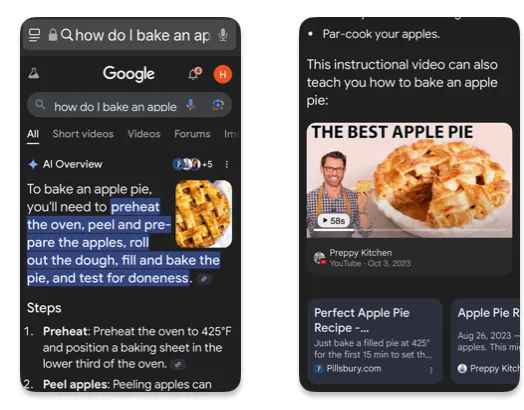 To request AI Overview results: - Add include_ai_overview=true to your search request - Set the engine to Google, engine=google - Set the domain to google.com, google_domain=google.com - Set the device as desktop or mobile, device=mobile The data results include: ai_overview_banner ai_overview_contents ai_overview_sources For more details, see our Search results documentation. |
February 2025
Update Type | Detail |
|---|---|
Enhancement | AI Overview results are now available in CSV format! Stay ahead in the evolving search landscape with SerpWow! As SEO expands into Generative Engine Optimization (GEO)—optimizing for generative AI and answer engines—SerpWow is here to help you stay competitive. In October, we released AI Overview data for desktop on google.com for JSON output. We have now expanded the output options to CSV. As a reminder, to request AI Overview data add the parameter include_ai_overview=true - Set the engine to Google, engine=google - Set the domain as google.com (or input a US location), google_domain=google.com - Set the device as desktop, device=desktop For CSV output, set output=csv. Below are the AI Overview fields available for output. For further instructions on how to request specific csv fields, see our documentation at CSV Fields Reference. 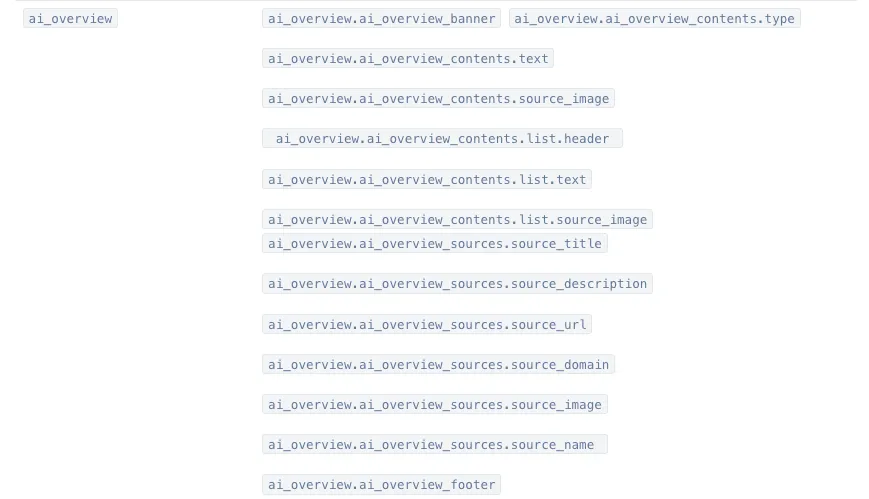 |
November 2024
Update Type | Detail |
|---|---|
New Feature | Track who’s appearing in the Courses carousel in Google web search with SerpWow The Courses Google SERP feature allows users to discover courses matching their search query through a dedicated carousel. For example, if you search for an English language course, Google presents a carousel showcasing platforms where you can enroll. SerpWow customers can now track if they’re appearing in Courses, as well as monitor competitors. This feature may also include details such as the course title, platform, pricing info, educational level, rating and duration. SerpWow returns an array with fields for these course details and others if they are present on the card. 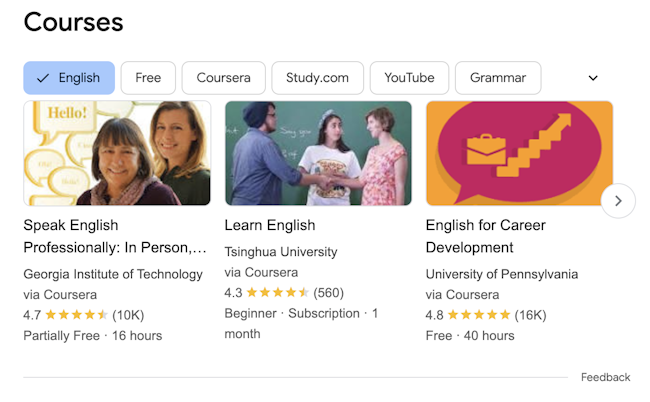 |
Enhancement | Enhanced extraction – Carousel in Google web results Google’s carousel (or list carousel) feature typically appears at the top of the search results page, displaying a list of items that provide information relevant to the user's query, e.g., “popular movies.” This type of carousel is returned for a variety of queries, such as a search for a listicle or movies/movie casts, music and sports teams. Each card of a carousel includes an image and might include a caption or other relevant details. SerpWow can now capture more data from these carousels. The carousel object now includes more details i.e. link, image, and rating (where applicable). 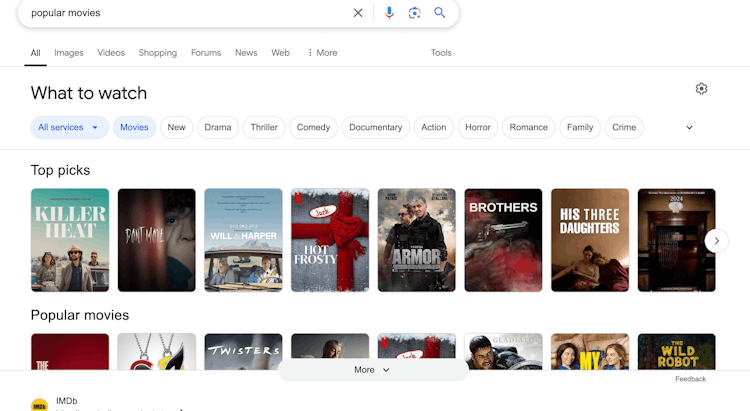 |
New Feature | Capture real-time Google News Top Stories overview Google News Top Stories shows breaking news based on location, language and timing. Whether you’re integrating a news feed into a product or analyzing news to understand how to improve your News ranking, SerpWow can now provide you results for the major news stories of the moment on news.google.com based on location and language. SerpWow extracts details of the top stories results along with related_NewsStories when you request search_type=news_top_stories (desktop only). *Note: This differs from type=news because it does not require a query parameter and extracts the default info displayed on news.google.com.  |
Enhancement | Find wheelchair accessibility info in Google Places results – Maps search and Place details SerpWow's Google Places results now include data to indicate if a business displays that it’s wheelchair accessible. For search_type=places on Google Maps, a business can have a wheelchair accessible icon or a crossed-off icon, indicating it’s not accessible. SerpWow returns: wheelchair_accessible = true / false For search_type=place_details requests with the data_cid parameter, SerpWow will return: wheelchair_accessibility object containing accessibility options such as seating, parking, restroom, and entrance. 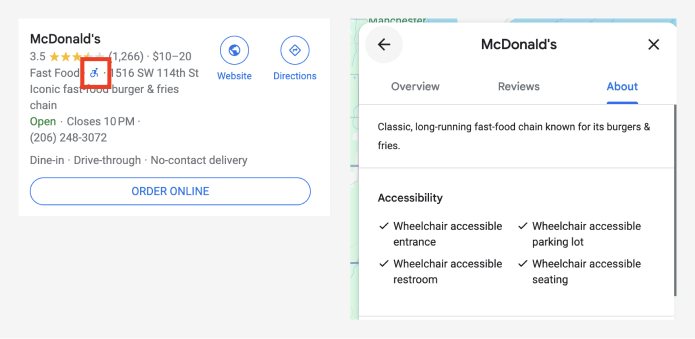 |
New Feature | Google: Sponsored Experiences now in Google Search results SerpWow Google Search results now return an array of sponsored experiences – Tickets & tours. Track competitors and spot new opportunities to stand out and drive revenue with this ad format. Data included: title link domain block_position source rating reviews price description (i.e. "entry included," "free cancelation" 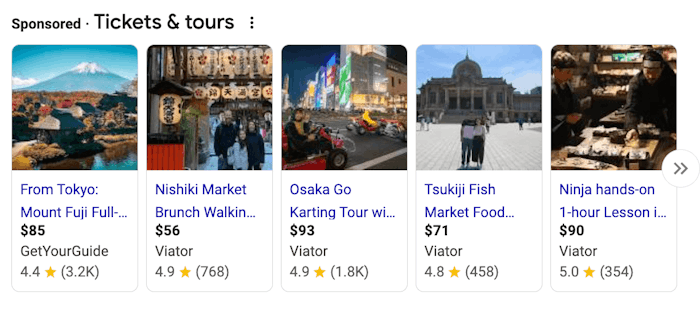 |
New Feature | Get Top sights in Google Search results Google's Top sights is a SERP feature that displays a rectangular box with 3-4 places to see or attractions, for a search query that mentions a location. See if your business is showing up for queries mentioning your business location, and track other businesses in your area that are landing a spot in this feature. SerpWow returns an array with the following data for Top sights: position title rating reviews description 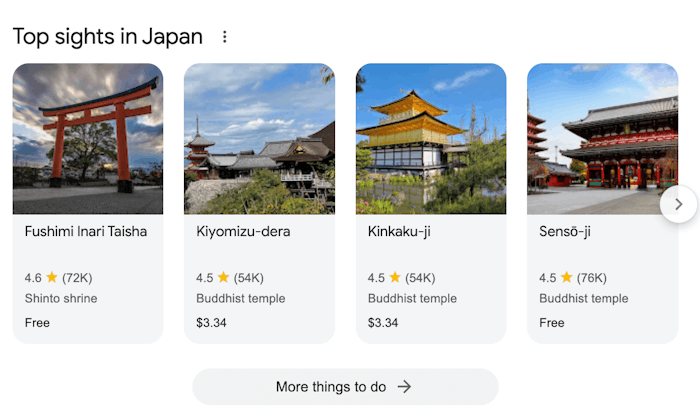 |
October 2024
Update Type | Detail |
|---|---|
New Feature | SerpWow is ready to support you as you expand from just traditional SEO strategy into the rapidly developing world of GEO (Generative Engine Optimization) – optimizing for generative AI and answer engines. SerpWow now provides Google AI Overview data (desktop, US only for now) to support your efforts in understanding and growing generative search performance. -Adapt content: The new data can help you understand Search Algorithm changes so you can adjust their keyword strategies -Optimize for AI-driven features: You get this data from a reliable source (us!) to run keywords at scale How to Request AI Overview Data -Set engine=google and add include_ai_overview=true as a parameter in your request -Make sure domain is set to .com (or input a US location) -Make sure you do not make it a mobile search (desktop only!) Data Returned ai_overview_banner - the banner ai_overview_contents type- header or list text - content ai_overview_sources source_title source_description source_url source_image source_name Let us know if we can help you with AIO results! 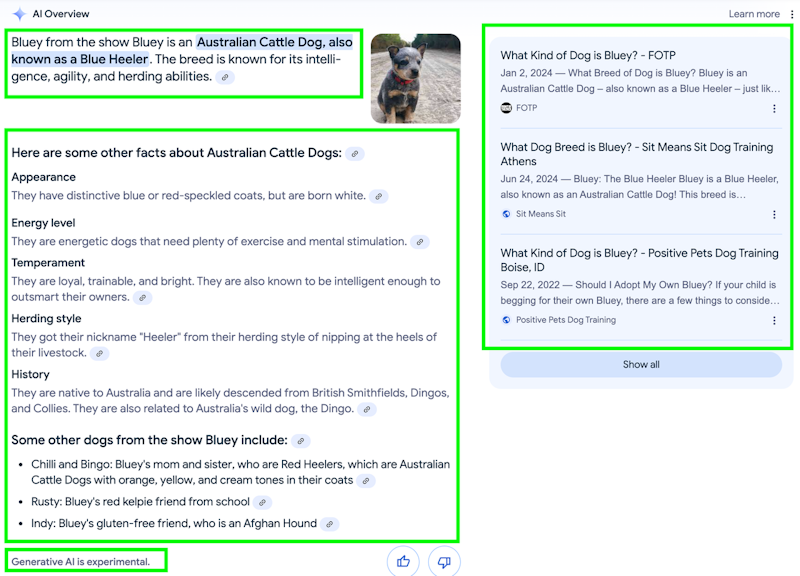 |
Enhancement | Google: Search – update to ad results In an effort to make our parsing more efficient, resulting in faster response times and delivering more consistent results, we’ve updated the block_position field to return a number value across all object responses, including the ads array. A new field, relative_block_position, has been added to the ads array. This field will replace the previous block_position functionality and will return a response of top or bottom. |
New Feature | From Sources Across the Web added to Google search results! SerpWow now includes From sources across the web results in the found_on_the_web object in Google desktop and mobile search results. Google's "From sources across the web" SERP feature shows users a collection of related summary content from various sources in a carousel or block format within the search results. 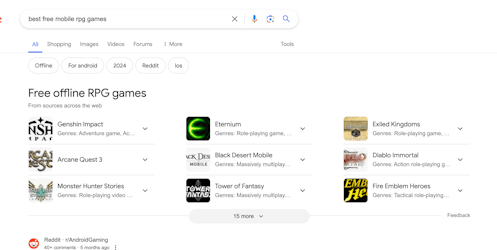 |
New Feature | Buying Guide added to Google search results! SerpWow now includes Buying guide results in Google search results. The Buying guide lets you drill down into the options of products you can buy based on your query with detailed comparisons of product features, prices and other purchasing considerations. SerpWow includes an array of buying_guide results related to the keyword: title items source related_search 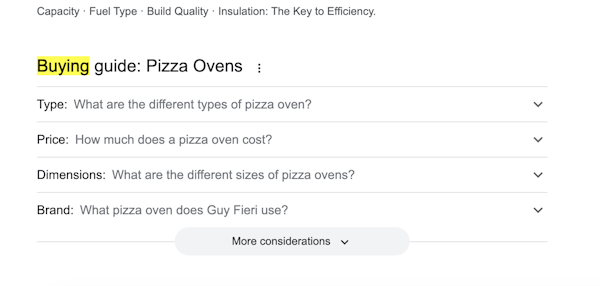 |
New Feature | SerpWow now includes Google Flights details in Google Search results Google Flights information is now available in SerpWow’s Google Search results. The new flights object includes detailed flight_results and price_trend information, and more. 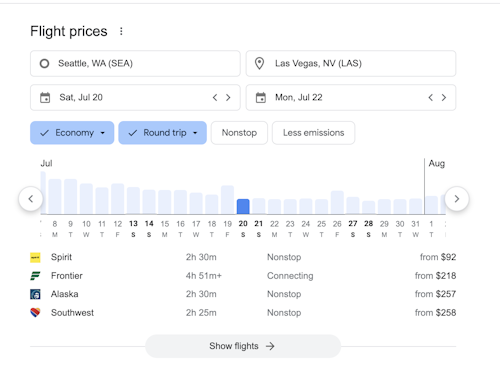 |
New Feature | SerpWow Google Search results now include Google Stocks Start collecting updated stock summaries at scale! SerpWow can now return Google Stocks results in Google Search results. The new stocks object captures title, price details, the snippet - summary of the stock’s recent performance - as well as other key stock statistics. 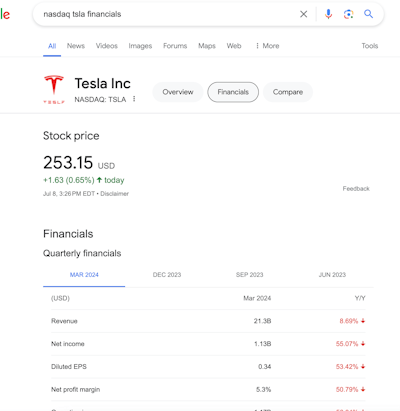 |
September 2024
Update Type | Detail |
|---|---|
New Feature | Things to Know added to Google search results! SerpWow now includes a things_to_know object in Google desktop search results. 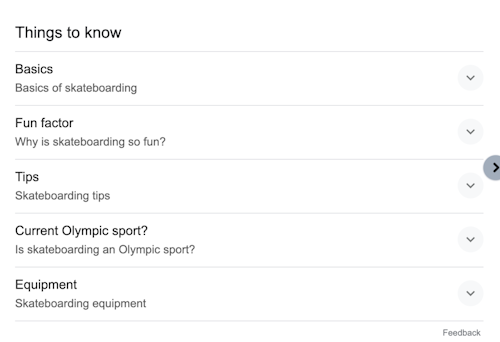 |
New Feature | Inline Hotels is now supported for Google mobile search results! SerpWow now parses inline_hotels when device=mobile for iPhone and Android.. 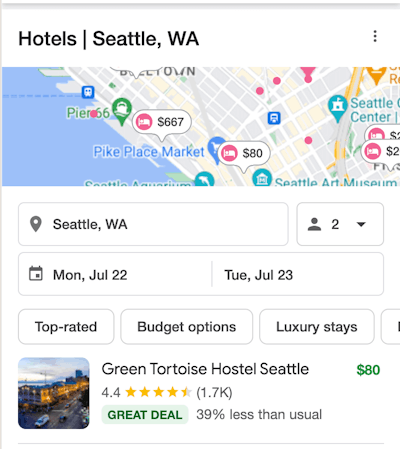 |
July 2024
Update Type | Detail |
|---|---|
New Feature | Apps & Short Videos added to Google search results! SerpWow now includes the apps and short_videos objects in Google mobile search results. The Apps feature displays mobile applications relevant to your search. The Short Videos feature displays search results for queries where a quick video response best fits the search intent.  |
New Feature | Jobs and Perspectives added to Google search results SerpWow now includes the Jobs and Perspectives objects in Google search results, desktop and mobile. The Jobs SERP feature provides information related to jobs, highlighting job openings in the searcher’s area or field of interest near the top of the results. The Perspectives carousel in search results is intended to help you see different perspectives on certain search topics.  |
New Feature | Google Search: Events and Popular products added to results SerpWow now includes events objects in Google search results. This SERP feature displays scheduled events happening at specific times and locations. SerpWow has also added popular_products objects in Google search results. This SERP feature displays a selection of items available for purchase related to your search term. |
June 2024
Update Type | Detail |
|---|---|
New Feature | Google AI Overview Detection Detects if the Google AI Overview is generated on the search results page. Add the include_ai_overview_check:true parameter in your GET request. ai_overview_included is set to true if the AI Overview is generated on the search page results. NOTE: This only checks for search results where the requestor is NOT logged into a Google account.  |
April 2024
Update Type | Detail |
|---|---|
New Feature | Google Search: Discussions and Forums added to SerpWow's search results Google’s Discussions and Forums are now included in SerpWow's search results. The Discussion and Forums object provides links to various forums and online discussions. For example, if you are searching "Planning a Disney vacation," Google will link you to discussions and forums to help you research the topic. The SerpWow discussions_and_forums object returns the properties: discussion_title , link , source information and block_position in its results.  |
March 2024
Update Type | Detail |
|---|---|
New Feature | Questions and Answers are now included in SerpWow's Google results Google’s Questions & Answers is a SERP feature that lists the sources for closely related questions and answers based on the question asked in a search query. SerpWow's questions_and_answers object returns the properties: question , answer , votes and source in its results. 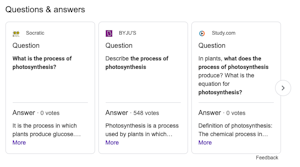 |
New Feature | Google Search: Explore Brands results available SerpWow now returns the explore_brands object in Google search results (desktop and mobile). The Explore Brands object lists suggested brands based on the search query with product descriptions and links to the product. Properties included are: title , description , link , image and description . Note: This feature is currently only available for engine=google .  |
July 2023
Update Type | Detail |
|---|---|
| Meet Our Newest API! 🎉 We’ve just launched Backyard API , our real-time Lowe’s product data API and companion to BigBox API for home improvement data . Let us know what you think of our newest addition or if you need any help. As always, you can try it out free! |
June 2023
Update Type | Detail |
|---|---|
New Feature | Google Search: Shopping graph results available SerpWow can now return the shopping elements that appear in Search results (desktop and mobile) as shopping_graphs . This Google feature is currently available only for searches on google.com. |
Enhancement | Ad_carousel (sponsored) is now returned in Google Shopping search results Ad_carousel is an array of Sponsored Shopping Result objects found within the carousel.  |
April 2023
Update Type | Detail |
|---|---|
| Business Update As a result of significant growth, our infrastructure — namely the dynamic routing of traffic to accommodate high volume customers — has recently required updates. Reworking architecture patterns and proxy configurations has taken us a fair amount of time, which in turn has led to some slower customer issue resolution. We'd like to assure you that we’ve identified and corrected the infrastructural shortcomings, and the outcome is a 50% increase in infrastructure and proxy capacity. We apologize for the potential business interruptions you may have experienced over the last couple months. Our aim is to earn your trust back and continue to support the realization of your business goals. Please don’t hesitate to get in touch if you require further information. |
Feburary 2023
Update Type | Detail |
|---|---|
Enhancement | Geo-target by latitude and longitude for Google searches SerpWow can now target Google searches by latitude and longitude. Location:lat:37.32646,lon:-121.80163 Make sure to include the gl & hl parameters. |
December 2022
Update Type | Detail |
|---|---|
Enhancement | Carousel header now returned for Job Pack (Google, EU) SerpWow now returns the "top carousel," or the details (carousel) at the top of a job pack 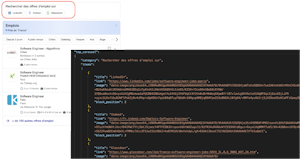 |
New Feature | Knowledge Graph is now returned for Bing Searches A new property for Bing search parsing has been added. The property returns the business title , description , website , category , rating , reviews , address , and phone . 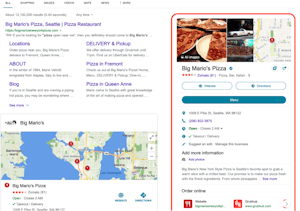 |
November 2022
Update Type | Detail |
|---|---|
Enhancement | Enhancement to Bing local_results array Business rating , reviews , and reviews_platform have been added to the local_results array for Bing Search.  |
Enhancement | Destination URL added to organic Baidu results The url for organic Baidu results has been added to the organic_results array.  |
Enhancement | Live and Video result types added for Google Top Stories Two new boolean properties video and live have been added to top_stories results. True if a top story is video format, False if not. And True when a top story is a live video, False if not.  |
July 2022
Update Type | Detail |
|---|---|
Enhancement | Search Tabs added to organic SERP results A search_tabs array property has been added to the search_information object for organic SERP pages. This new property shows which search result types (i.e. Maps, Images, News etc) are available for the given query. 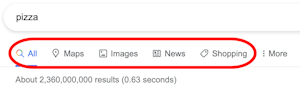 |
Enhancement | Scholarly Articles returned for organic web searches A new field scholarly_articles has been added to the APIs organic web search results to expose the Scholarly Articles section (containing links to Google Scholar) at the top of the SERP. 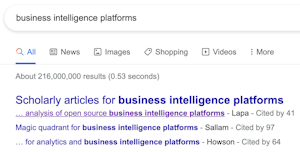 |
June 2022
Update Type | Detail |
|---|---|
New Feature | Support for custom S3-compatible object stores in Destinations It's now possible to specify a custom S3 endpoint to have Destinations upload Result Sets to any S3 compatible object store. 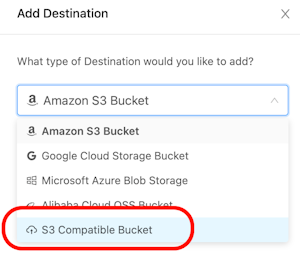 |
May 2022
Update Type | Detail |
|---|---|
Enhancement | Typical Prices from Across the Web parsed for Google Products A new property for Google Product parsing has been added - typical_prices_across_web . The property shows the low and high price values, parsed with currency values.  |
April 2022
Update Type | Detail |
|---|---|
Enhancement | Enhanced Film Info parsing A new film_info object has been added to the organic web search parsing to extract detailed information about film listings, including title, genre, reviews, VOD services etc. 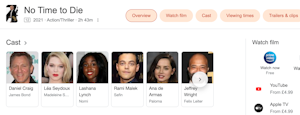 |
Feburary 2022
Update Type | Detail |
|---|---|
New Feature | Inline Recipes returned in Google web results A new inline_recipes property has been added to regular Google organic web search results to return the food recipe data shown inline with organic search results. 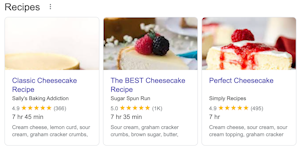 |
Enhancement | Enhanced "about this result" Google organic results parsing The about_this_result parsing has been updated to extract the "search terms" and "related terms" sections of the result. 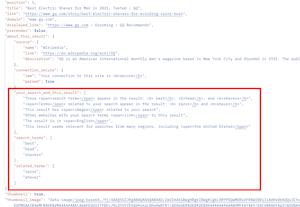 |
January 2022
Update Type | Detail |
|---|---|
New Feature | Nested Results added to organic results parsing A new nested_results array, showing any results nested under an organic result, has been added to objects in the organic_results array for regular web search results for Google. 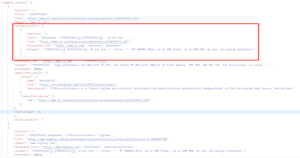 |
December 2021
Update Type | Detail |
|---|---|
Enhancement | HTML review body added to Place Reviews results The full HTML body of the review has been added to search_type=place_reviews responses to allow customized parsing of the HTML content. 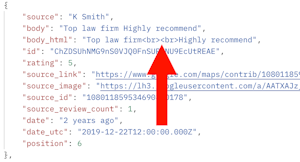 |
November 2021
Update Type | Detail |
|---|---|
Enhancement | Bing Related Searches SerpWow now returns Related Searches for Bing organic web search requests.  |
Enhancement | Select all CSV fields We have added Select All / Select None options to quickly select all CSV fields in the Batch editor and API Playground to make choosing CSV fields much quicker. |
September 2021
Update Type | Detail |
|---|---|
Enhancement | "has_product_page" property added to Shopping results A new boolean proper has_product_page has been added to search_type=shopping results. When has_product_page=true you may use the id property in a subsequent search_type=product requests' product_id field to request data from that individual product's landing page. Not all results on Google Shopping have an individual product landing page, so you can use the has_product_page property to determine whether a product page is available. |
Enhancement | Video results - "date_utc" and "domain" fields added Two news fields have been added to the Google Video results - domain and date_utc (date UTC is an API-parsed ISO timestamp for the relative date time - i.e. "5 hours ago" shown next to the Google Video result). |
New Feature | "Related Products" added to the Google Products API results Related Products, as shown in the carousel on the Google Product landing page, have been added to the search_type=product request. Price, rating, link, image and product title are retrieved.  |
Enhancement | Filter Batches by Last Run date The Batches List API has been updated to allow sorting Batches by last_run date. You can also now filter the Batches by date using the last_run_before and last_run_after request parameters.The Batches Dashboard has also been updated to show the Last Run date for each Batch.  |
August 2021
Update Type | Detail |
|---|---|
Enhancement | Per-minute Batch scheduling improvements The Per X Minutes Batch scheduling options have been extended to allow you to run Batches on a "Per X Minute" schedule restricted to specific hours of the day and days of the week or month.The schedule_hours , schedule_days_of_week and schedule_days_of_month can now be used with schedule_type=minutes Batches for additional flexibility. This allows for scenarios such as "run this Batch every 5 minutes, between 9am and 5pm, on weekdays only". 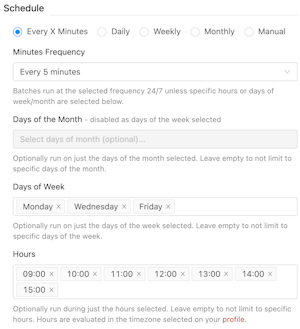 |
New Feature | Run Batches on a per-minute schedule Batches can now be scheduled on a per-minute basis, in addition to the existing hourly, daily, weekly and monthly schedules. Set schedule_type=minutes when creating your Batch and specify the per-minute schedule using the schedule_minutes parameter. Per-minute schedules of every minute up to every hour are supported.  |
New Feature | Account Balance added to Account API The Account API has been updated to include your current Account Balance in the account_balance_usd property. Your Account Balance is used to settle any Overage charges (to avoid multiple small overage charges being made to your payment card). You can top up your Account Balance at any time on the Account page of the Dashboard. |
New Feature | Grouped "related searches" SerpWow will now return expanded related searches (in addition to the standard related searches already returned) that are grouped under a particular group heading. New properties have been added to the related searches array showing the group name and type. Regular related searches will have type=standard and grouped related searches will have type=group . When type=group then the group_name property is populated. 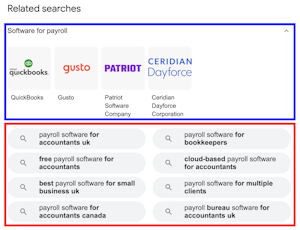 |
New Feature | Local Service Sponsored Ads parsing added Local Service Ads parsing has been added to the API's response and is exposed in the local_service_ads property. 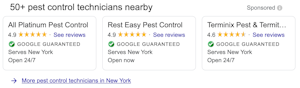 |
Enhancement | Rich snippets attributes extraction Parsing of the name/value pair attributes from the rich snippet section of organic results has been added to the API's parsing. 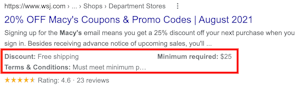 |
New Feature | New Batches API endpoint to Stop All queued and running Batches The new Stop All Batches API endpoint allows you to stop all running and queued Batches on your account in one API call. Useful if you have accidentally started a large number of Batches and need a quick way to set them all back to idle . |
July 2021
Update Type | Detail |
|---|---|
New Feature | Android and iPhone browsers available for mobile SERP parsing The new mobile_type parameter allows you to choose to execute your device=mobile requests using an Android or iPhone mobile browser. 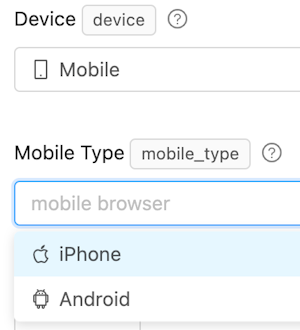 |
New Feature | Locations API support for Bing Added the ability to specify a location parameter for Bing requests to mirror that already available for Google requests. Also added the ability to run Bing requests in the context of a specific latitude and longitude. 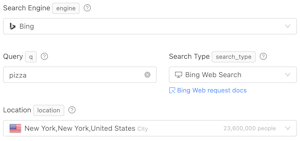 |
We started publishing Product Updates in June 2021, please refer to update emails for updates before this date. |
|---|